

- Home
- Game points
- Minecraft Minecoins Pack 1720 Coins (Globa...

Minecraft Minecoins Pack 1720 Coins (Global) - Xbox Live - Digital Key
Region: Global

platform: Xbox Live
Region
Platform
Global
 Driffle's choice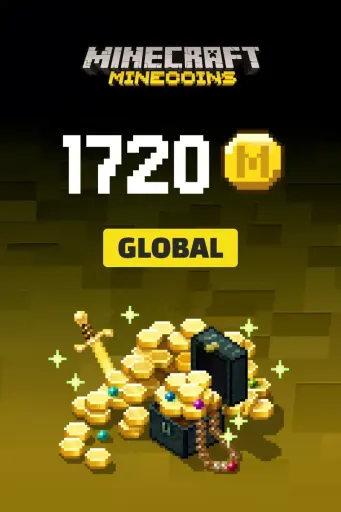
US$11.78
~ 38%US$11.78
~ 35%US$11.78
~ 38%:
Seller Rating 4.4
US$11.78
~ 44%US$11.78
~ 41%US$11.78
~ 44%Seller Rating 4.4
Seller Rating 4.3
US$11.78
~ 44%US$11.78
~ 41%US$11.78
~ 44%Seller Rating 4.3

Seller Rating 4.8
US$11.78
~ 28%US$11.78
~ 24%US$11.78
~ 28%Seller Rating 4.8
Seller Rating 4.9
US$11.78
~ 28%US$11.78
~ 24%US$11.78
~ 28%Seller Rating 4.9
Product description
Minecraft Minecoins Pack 1720 Coins (Global) - Xbox Live - Digital Key
Minecraft Minecoins for Xbox Live are the official premium in-game currency used to purchase content from the Minecraft Marketplace. Use Minecoins to unlock worlds, skin packs, texture packs, adventure maps, mini-games, and other creator-made content. Once redeemed through your Xbox account, your Minecoins are added directly to your Microsoft account balance and are available instantly in the Minecraft Marketplace.
Key Features
- Official premium currency for Minecraft on Xbox.
- Purchase worlds, skin packs, texture packs, and adventure maps.
- Access creator-made content from the Minecraft Marketplace.
- Available in multiple Minecoin denominations.
- Compatible with Minecraft: Bedrock Edition on Xbox One and Xbox Series X|S.
- Instant digital delivery for fast redemption.
- Secure redemption through your Xbox account.
- No physical product or shipping required.
- Requires Minecraft, an Xbox/Microsoft account, and an internet connection.
- Perfect for expanding and customizing your Minecraft experience.
Activation Guide
- Sign in to your Xbox account on your console.
- Redeem your purchased code through the Microsoft Store or the Xbox code redemption page.
- Launch Minecraft: Bedrock Edition using the same Xbox account.
- Open the Minecraft Marketplace.
- Your Minecoins will be credited automatically to your account balance.
- If the Minecoins do not appear immediately, restart the game and allow a few minutes for synchronization.
Other details
- Release date2018-08-14
- PublishersMicrosoft Studios
- DevelopersMicrosoft Studios
Driffle's choiceUS$11.78
~ 38%US$11.78
~ 35%US$11.78
~ 38%:
Seller Rating 4.4
US$11.78
~ 44%US$11.78
~ 41%US$11.78
~ 44%Seller Rating 4.4
Seller Rating 4.3
US$11.78
~ 44%US$11.78
~ 41%US$11.78
~ 44%Seller Rating 4.3
Seller Rating 4.8
US$11.78
~ 28%US$11.78
~ 24%US$11.78
~ 28%Seller Rating 4.8
Seller Rating 4.9
US$11.78
~ 28%US$11.78
~ 24%US$11.78
~ 28%Seller Rating 4.9
Product description
Minecraft Minecoins Pack 1720 Coins (Global) - Xbox Live - Digital Key
Minecraft Minecoins for Xbox Live are the official premium in-game currency used to purchase content from the Minecraft Marketplace. Use Minecoins to unlock worlds, skin packs, texture packs, adventure maps, mini-games, and other creator-made content. Once redeemed through your Xbox account, your Minecoins are added directly to your Microsoft account balance and are available instantly in the Minecraft Marketplace.
Key Features
- Official premium currency for Minecraft on Xbox.
- Purchase worlds, skin packs, texture packs, and adventure maps.
- Access creator-made content from the Minecraft Marketplace.
- Available in multiple Minecoin denominations.
- Compatible with Minecraft: Bedrock Edition on Xbox One and Xbox Series X|S.
- Instant digital delivery for fast redemption.
- Secure redemption through your Xbox account.
- No physical product or shipping required.
- Requires Minecraft, an Xbox/Microsoft account, and an internet connection.
- Perfect for expanding and customizing your Minecraft experience.
Activation Guide
- Sign in to your Xbox account on your console.
- Redeem your purchased code through the Microsoft Store or the Xbox code redemption page.
- Launch Minecraft: Bedrock Edition using the same Xbox account.
- Open the Minecraft Marketplace.
- Your Minecoins will be credited automatically to your account balance.
- If the Minecoins do not appear immediately, restart the game and allow a few minutes for synchronization.
Other details
- Release date2018-08-14
- PublishersMicrosoft Studios
- DevelopersMicrosoft Studios
Region