

Last updated: 1 October 2026
First released on PC in 2024, Palworld quickly became one of the most talked-about survival games, thanks to its mix of open-world exploration, crafting, base-building, and creature-catching gameplay. Even after its massive launch, the game continues to attract new players who want to jump in with friends across different platforms. Because of that, many players ask: Is Palworld cross platform? Does it support crossplay and cross-progression? Well, this guide will help clear that up. Let’s dive in.

Is Palworld Cross Platform?
The direct answer to this question is yes, Palworld is cross-platform now. Earlier, players could not fully play together across different platforms. But after the March 2025 update v0.5.0, Palworld added crossplay across all platforms. This means players on PC, Xbox, PlayStation 5, and Mac can play together in multiplayer. So, if your friend is on Xbox and you are on PC or PS5, you can still join the same world and enjoy Palworld together. The update also added features like Global Palbox, which lets players transfer Pals between worlds.
Furthermore, the update also added Dimensional Pal Storage, Cosmetic Armour System, Photo Mode, Drafting Table, Dedicated servers for Mac, specification and balance adjustments, and several bug fixes.
Palworld Crossplay compatibility on All Platforms
Palworld crossplay supports all major platforms together, including Game Pass PC, Game Pass Xbox, Steam, and PS5. Check out the complete compatibility table below.
| Platform 1 | Platform 2 | Crossplay Compatability |
| Game Pass (PC) | Game Pass (PC) | Yes, compatible |
| Game Pass (PC) | Game Pass (Xbox) | Yes, compatible |
| Game Pass (PC) | Steam | Yes, compatible |
| Game Pass (PC) | PS5 | Yes, compatible |
| Game Pass (Xbox) | Game Pass (Xbox) | Yes, compatible |
| Game Pass (Xbox) | Steam | Yes, compatible |
| Game Pass (Xbox) | PS5 | Yes, compatible |
| Steam | Steam | Yes, compatible |
| Steam | PS5 | Yes, compatible |
| PS5 | PS5 | Yes, compatible |
How to enable (and disable) crossplay in Palworld?
Enabling crossplay in Palworld can be a little confusing for players who have not changed their world settings before. Follow these easy steps to enable or disable crossplay in Palworld and play with friends across different platforms.
- Open Palworld and go to the world you want to play in.
- Select your multiplayer world from the world list.
- Click on Change World Settings before starting the game.
- Look for the Cross-Play option in the settings menu.
- Turn Cross-Play ON if you want to play with friends on other platforms like PC, Xbox, and PS5.
- Turn Cross-Play OFF if you only want to play with players on the same platform.
- Start the world after saving the settings.
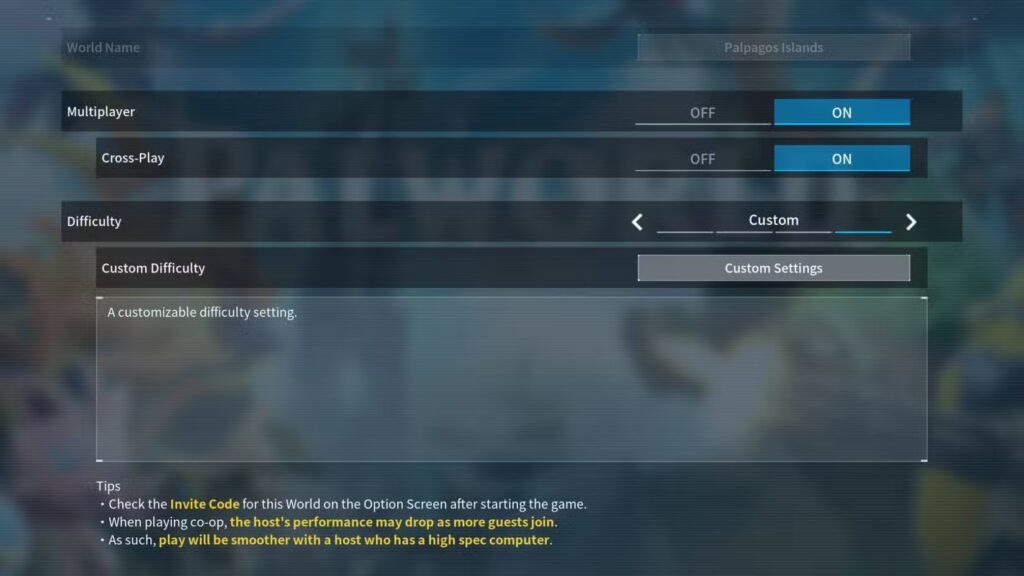
Note that only the host player needs to change the crossplay setting, and other players can simply join the world. Once crossplay is enabled, players from different platforms can join the same session, visit bases, explore the world, fight bosses, and play together.
Does Palworld Have Cross-Progression?
The direct answer to this question is no. Palworld does not fully support cross-progression. This means your save data, world progress, characters, and items do not automatically transfer between all platforms. For example, if you play Palworld on Steam and later switch to PS5 or Xbox, your progress may not carry over. However, the game does have features like Global Palbox, which lets players move Pals between different worlds, but this is not the same as full cross-progression.
On which platform do you play Palworld? Let us know in the comments section below. And for more gaming news, guides, tips, tricks, codes, and more, don’t forget to check out Driffle Blog.


