

Released almost three years ago, Counter Strike 2 (CS2) remains one of the most popular and most played games on PC. The FPS shooter game is played by over a million people almost every day. As the game continues to gain more popularity and more players, many people ask what the best Counter Strike 2 system requirements are. In this simple guide, we’ll help you figure out whether your PC can run CS2. Minimum, recommended, and ultra specs, download size, storage requirements, and much more for Counter-Strike 2. Let’s dive in.

Counter Strike 2 System Requirements for PC
Below are the minimum, recommended, and ultra system requirements for Counter Strike 2 on PC. CS2 features improved graphics, lighting, physics, and overall performance upgrades compared to CS: GO, which means the game can be more demanding on older systems. While low-end PCs can still run the game with optimized settings, mid-range and high-end hardware will provide smoother gameplay, faster loading times, and better visual quality.
Counter Strike 2 System Requirements (Minimum)
| System Component | Minimum Requirements |
| Operating System | Windows 10 (64-bit) |
| Processor | Intel Core i5-750 or higher with at least 4 hardware CPU threads |
| Memory (RAM) | 8 GB RAM |
| Graphics Card | DirectX 11-compatible GPU with 1 GB VRAM and Shader Model 5.0 support |
| DirectX Version | DirectX 11 |
| Storage Space | 85 GB available space |
| Internet Connection | Stable broadband internet connection required |
| Sound Card | DirectX-compatible audio device |
| Resolution Support | 720p minimum supported resolution |
| Recommended Storage Type | SSD is recommended for faster loading times and smoother performance |
| Input Requirements | Keyboard and mouse |
| Additional Notes | Performance may vary depending on graphics settings, background applications, and driver updates |
Counter Strike 2 System Requirements (Recommended)
| System Component | Recommended Requirements |
| Operating System | Windows 11 64-bit |
| Processor (CPU) | Intel Core i5-10400 / AMD Ryzen 5 3600 or higher |
| Memory (RAM) | 16 GB RAM |
| Graphics Card (GPU) | NVIDIA GeForce RTX 3060 / AMD Radeon RX 6600 or equivalent |
| VRAM | 6 GB VRAM |
| DirectX | Version 12 |
| Storage Space | 85 GB available space |
| Storage Type | SSD required |
| Internet Connection | Stable broadband internet connection |
| Resolution Target | 1080p High Settings |
| Expected Performance | 120+ FPS for competitive gameplay |
| Sound Card | DirectX-compatible audio device |
| Additional Notes | Recommended for smooth gameplay, better visuals, and stable FPS during intense matches |
(Ultra) Counter Strike 2 System Requirements
| System Component | Ultra Requirements |
| Operating System | Windows® 11 64-bit |
| Processor (CPU) | Intel Core i7-12700K / AMD Ryzen 7 7800X3D or higher |
| Memory (RAM) | 32 GB RAM |
| Graphics Card (GPU) | NVIDIA GeForce RTX 4070 / AMD Radeon RX 7900 XT or higher |
| VRAM | 12 GB VRAM |
| DirectX | Version 12 Ultimate |
| Storage Space | 85 GB SSD space |
| Storage Type | NVMe SSD recommended |
| Internet Connection | High-speed broadband connection |
| Resolution Target | 1440p / 4K Ultra Settings |
| Expected Performance | 240+ FPS for high refresh rate competitive gaming |
| Sound Card | High-definition DirectX-compatible audio device |
| Additional Notes | Ideal for max settings, ultra textures, ray tracing support, and esports-level high refresh rate gameplay |
Can Your PC Run CS 2?
Your PC can run Counter Strike 2 smoothly without major issues. If your PC has at least an Intel Core i5 or Ryzen 5 processor, 8 GB RAM, and a DirectX 11-compatible graphics card, you should be able to play CS2 on low to medium settings comfortably. For better FPS and smoother competitive gameplay, having 16 GB RAM, an SSD, and a newer GPU like an RTX 2060 is recommended.
Since CS2 is more demanding than CS: GO since September 2023, due to upgraded graphics and lighting, low-end PCs may need reduced settings to maintain stable performance. Overall, a decent mid-range gaming setup can run CS2 quite well.
CS 2 Download Size and Storage Requirements
Counter Strike 2 requires around 85 GB of free storage space on your PC. However, it is recommended to keep at least 100 GB or more available to ensure the game installs properly and runs smoothly without performance issues. Having extra free space also helps with future updates, cache data, and faster loading times. For the best experience, installing CS2 on an SSD is highly recommended, as it can reduce loading screens, improve texture streaming, and help minimize stuttering or lag during gameplay.
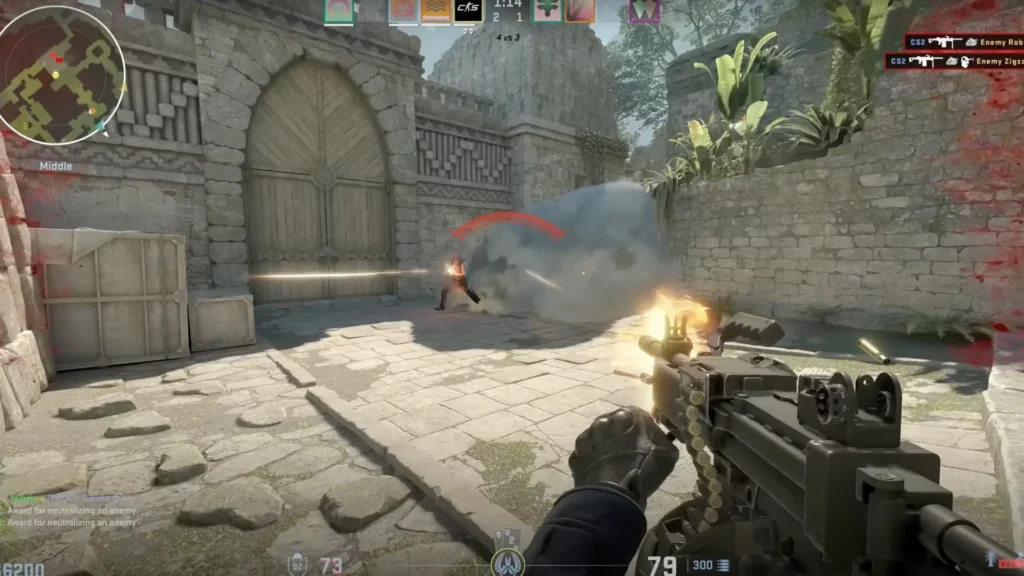
Best Settings for Counter Strike 2 on Low-End PCs
If you are playing Counter Strike 2 on a low-end or older PC, lowering a few graphics settings can greatly improve FPS and make gameplay smoother. The best option is to play at 720p. Keep shadows, anti-aliasing, and particle effects on low, as these settings slow down your performance.
You should also disable unnecessary background applications and enable fullscreen mode for better responsiveness. Installing the game on an SSD and updating your graphics drivers can also help reduce stuttering and loading times. With the right settings, even budget gaming PCs can run CS2 smoothly for competitive gameplay.
How to Improve FPS in Counter Strike 2?
Here are some important tips to improve FPS and get smoother gameplay in Counter Strike 2:
- Lower graphics settings such as shadows, effects, and anti-aliasing.
- Play in fullscreen mode for better performance and lower input lag.
- Update your graphics drivers regularly.
- Close unnecessary background apps and browser tabs while gaming.
- Install CS2 on an SSD for faster loading and reduced stuttering.
- Reduce your screen resolution if FPS is unstable.
- Enable Game Mode in Windows.
- Keep enough free storage space on your PC.
- Disable startup programs that consume RAM and CPU usage.
- Use performance-focused launch options if needed.
- Monitor CPU and GPU temperatures to avoid overheating.
- Lower NVIDIA Reflex or V-Sync settings if experiencing input delay.
- Upgrade RAM to 16 GB for better multitasking and smoother gameplay.
- Use a stable internet connection to avoid lag spikes during matches.
- Restart your PC before long gaming sessions for optimal performance.

Does your system fulfill the requirements for Counter Strike 2? And what are the best ones according to you? Let us know in the comments section below. And for more gaming news, guides, tips, tricks, codes, and more, don’t forget to check out Driffle Blog.


