


Nuance Dragon Professional 16 (Global) (PC) 1 Device Lifetime - Digital Key
Regione: Global

Piattaforma: Nuance
Funziona su: Windows
Regione
Piattaforma
Funziona su
Global
Avviso importante:
Questa licenza è compatibile solo con Windows e supporta solo la versione inglese.
 Scelta di Driffle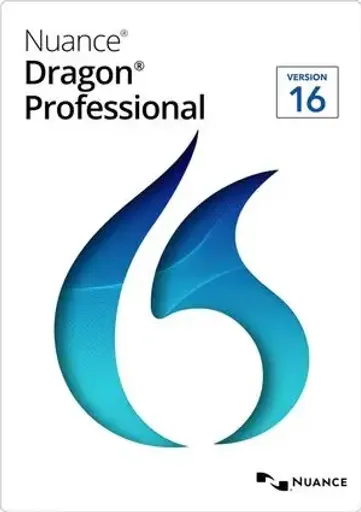
Descrizione del prodotto
Informazioni Nuance Dragon Professional 16 (Global) (PC) 1 Device Lifetime - Digital Key
Nuance Dragon Professional 16 è una soluzione professionale di riconoscimento vocale e produttività della voce progettata per aiutare gli utenti a creare documenti, dettare il testo, controllare le applicazioni supportate e svolgere attività quotidiane del computer utilizzando la loro voce.
Dragon Professional 16 fornisce un accurato riconoscimento vocale-text e consente agli utenti di dettare documenti, e-mail, report, note e altri contenuti utilizzando comandi vocali per navigare e controllare le applicazioni Windows supportate.
Il software si adatta alla voce e al vocabolario dell'utente nel tempo, fornendo un'esperienza di dettatura personalizzata e aiutando a migliorare la produttività.
CARATTERISTICHE PRINCIPALI:
- Riconoscimento vocale avanzato e dittazione vocale
- Convertire parole parlate in testo in tempo reale
- Creare e modificare documenti utilizzando comandi vocali
- Controllo supportato applicazioni Windows da voce
- Disdire e-mail, report, note e documenti
- Riconoscimento vocale personalizzato
- Supporto per vocabolario personalizzato e terminologia specializzata
- Comandi vocali per compiti ripetitivi e flussi di lavoro
- Progettato per la produttività professionale e aziendale
- Conversione veloce e accurata del discorso al testo
COMPATIBILITÀ:
- Sistema operativo: solo Windows
- Lingua: solo la versione inglese
- Dispositivi: 1 Dispositivo
- Durata della licenza: Durata della vita
DOWNLOAD & ACTIVATION INSTRUZIONI:
- Visita il Centro di download ufficiale del prodotto Nuance:https://download.nuance.com/Nuance/downloadform.aspx?language=en-EN
- Completa le informazioni richieste nella pagina di download.
- Seguire le istruzioni visualizzate da Nuance per scaricare i file di installazione Dragon Professional 16.
- Eseguire l'installatore scaricato e seguire la procedura guidata di installazione.
- Accetti il contratto di licenza e inserisci il numero di serie Dragon Professional 16 quando richiesto.
- Completa l'installazione e lancia Dragon Professional 16.
- Quando viene visualizzata la finestra di attivazione, selezionare Attiva prodotto e fare clic su Avanti.
- Confermare il numero di serie e continuare con l'attivazione online.
- Fare clic su Fine una volta completato il processo di attivazione.
Per scaricare e attivare il prodotto è necessaria una connessione internet attiva.
Altri dettagli
- EditoriNuance
- SviluppatoriNuance
Scelta di DriffleDescrizione del prodotto
Informazioni Nuance Dragon Professional 16 (Global) (PC) 1 Device Lifetime - Digital Key
Nuance Dragon Professional 16 è una soluzione professionale di riconoscimento vocale e produttività della voce progettata per aiutare gli utenti a creare documenti, dettare il testo, controllare le applicazioni supportate e svolgere attività quotidiane del computer utilizzando la loro voce.
Dragon Professional 16 fornisce un accurato riconoscimento vocale-text e consente agli utenti di dettare documenti, e-mail, report, note e altri contenuti utilizzando comandi vocali per navigare e controllare le applicazioni Windows supportate.
Il software si adatta alla voce e al vocabolario dell'utente nel tempo, fornendo un'esperienza di dettatura personalizzata e aiutando a migliorare la produttività.
CARATTERISTICHE PRINCIPALI:
- Riconoscimento vocale avanzato e dittazione vocale
- Convertire parole parlate in testo in tempo reale
- Creare e modificare documenti utilizzando comandi vocali
- Controllo supportato applicazioni Windows da voce
- Disdire e-mail, report, note e documenti
- Riconoscimento vocale personalizzato
- Supporto per vocabolario personalizzato e terminologia specializzata
- Comandi vocali per compiti ripetitivi e flussi di lavoro
- Progettato per la produttività professionale e aziendale
- Conversione veloce e accurata del discorso al testo
COMPATIBILITÀ:
- Sistema operativo: solo Windows
- Lingua: solo la versione inglese
- Dispositivi: 1 Dispositivo
- Durata della licenza: Durata della vita
DOWNLOAD & ACTIVATION INSTRUZIONI:
- Visita il Centro di download ufficiale del prodotto Nuance:https://download.nuance.com/Nuance/downloadform.aspx?language=en-EN
- Completa le informazioni richieste nella pagina di download.
- Seguire le istruzioni visualizzate da Nuance per scaricare i file di installazione Dragon Professional 16.
- Eseguire l'installatore scaricato e seguire la procedura guidata di installazione.
- Accetti il contratto di licenza e inserisci il numero di serie Dragon Professional 16 quando richiesto.
- Completa l'installazione e lancia Dragon Professional 16.
- Quando viene visualizzata la finestra di attivazione, selezionare Attiva prodotto e fare clic su Avanti.
- Confermare il numero di serie e continuare con l'attivazione online.
- Fare clic su Fine una volta completato il processo di attivazione.
Per scaricare e attivare il prodotto è necessaria una connessione internet attiva.
Altri dettagli
- EditoriNuance
- SviluppatoriNuance
Regione