

Last updated: 1 October 2026
Minecraft remains one of the most popular games in the world, but one question still confuses players: Is Minecraft cross-platform? The short answer is yes, but only partially. Minecraft supports crossplay, but it depends on which edition of the game you’re using. In this guide, we’ll break down everything in a simple way, including the differences, supported platforms, full crossplay compatibility, and much more. Let’s dive in.

Minecraft Cross-platform Explained (Edition-wise)
Minecraft is divided into two primary versions, and understanding the difference between them is essential if you want to know how cross-platform play works. The first is Java Edition, the original version of the game, available exclusively on PC (Windows, macOS, and Linux). The second is Bedrock Edition, which is the more modern, unified version designed to run across a wide range of devices, including consoles, mobile phones, and even Windows PCs.
The key point is that cross-platform play in Minecraft depends entirely on which edition you are using.
Minecraft Bedrock Edition
Bedrock Edition is the version of Minecraft where cross-platform play works seamlessly. It’s designed to connect players across different devices without requiring any complicated setup or third-party tools. This edition runs on a wide range of platforms, including Windows 10 and 11, Xbox consoles, PlayStation consoles, Nintendo Switch, as well as iOS and Android devices.
What makes Bedrock Edition stand out is that all these platforms are part of a single unified ecosystem. As long as players are signed in with a Microsoft account and have added each other as friends, they can join the same world and play together instantly. There’s no need for mods, manual server configurations, or technical adjustments. Crossplay is built-in and works automatically, making it the easiest way to enjoy Minecraft with friends across different devices.
How to Play Cross-Platform on Bedrock?
- Sign in with your Microsoft (Xbox) account on your device.
- Add your friends using their Xbox Gamertag.
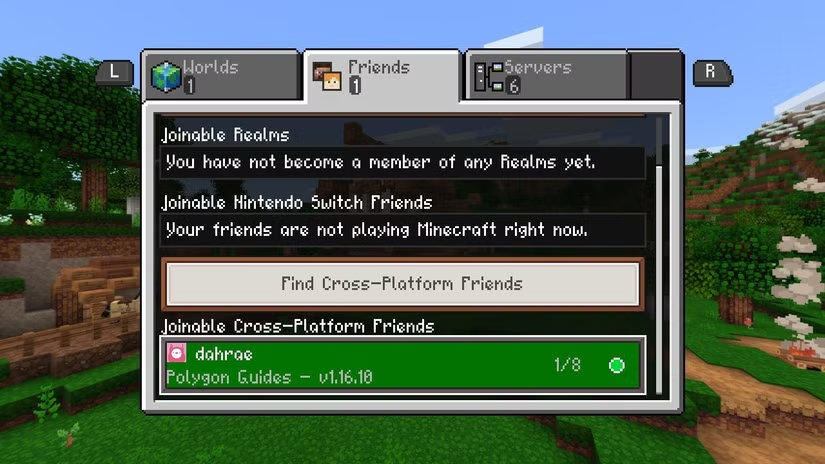
- Go to the “Friends” tab and join their world or accept an invite.
Once you’re signed in with the same Microsoft account, you can easily switch between devices, starting on mobile and continuing on a console, while your progress, purchases, and friends list stay synced across all platforms.
Minecraft Java Edition
Minecraft Java Edition does not natively support cross-platform play with other devices. It is designed specifically for PC users (Windows, macOS, and Linux), and by default, it only allows multiplayer between players running the same Java Edition. This means you cannot directly join or invite players from consoles, mobile devices, or Bedrock Edition worlds.
However, there is a workaround for players who want to bridge this gap. If you are hosting or managing a Java server, you can install third-party tools. These plugins act as a compatibility layer, allowing Bedrock Edition players (from mobile, console, or Windows Bedrock) to connect to a Java server.
That said, Minecraft does not officially support this setup and may come with some limitations. Certain features, mechanics, or gameplay elements might not function the same across editions, and server configuration can require some technical setup. Still, for many players, it’s a practical way to enable crossplay between Java and Bedrock environments.
Full Minecraft Cross-platform/ Crossplay Compatibility Table (2026)
To make things simple, the table below breaks down Minecraft cross-platform support in 2026, so you can instantly see who can play with whom.
| Your Platform | Windows (Java) | Windows (Bedrock) | macOS (Java) | Linux (Java) | Xbox (Bedrock) | PlayStation (Bedrock) | Switch (Bedrock) | iOS/Android (Bedrock) |
| Windows (Java) | Yes (Java) | No | Yes (Java) | Yes (Java) | No | No | No | No |
| Windows (Bedrock) | No | Yes (Bedrock) | No | No | Yes (Bedrock) | Yes (Bedrock) | Yes (Bedrock) | Yes (Bedrock) |
| macOS (Java) | Yes (Java) | No | Yes (Java) | Yes (Java) | No | No | No | No |
| Linux (Java) | Yes (Java) | No | Yes (Java) | Yes (Java) | No | No | No | No |
| Xbox (Bedrock) | No | Yes (Bedrock) | No | No | Yes (Bedrock) | Yes (Bedrock) | Yes (Bedrock) | Yes (Bedrock) |
| PlayStation (Bedrock) | No | Yes (Bedrock) | No | No | Yes (Bedrock) | Yes (Bedrock) | Yes (Bedrock) | Yes (Bedrock) |
| Switch (Bedrock) | No | Yes (Bedrock) | No | No | Yes (Bedrock) | Yes (Bedrock) | Yes (Bedrock) | Yes (Bedrock) |
| iOS/Android (Bedrock) | No | Yes (Bedrock) | No | No | Yes (Bedrock) | Yes (Bedrock) | Yes (Bedrock) | Yes (Bedrock) |
Key Takeaways:
- Java Edition only supports crossplay with other Java platforms (Windows, macOS, Linux).
- Bedrock Edition supports full crossplay across all supported devices.
- There is no official crossplay between Java and Bedrock editions.
Minecraft Java and Bedrock On One PC
If you’re playing on Windows, you actually get the best of both worlds. With a single Microsoft account, you can own and access both Minecraft Java Edition and Bedrock Edition. This makes it easy to switch between playing on Java servers and joining friends on Bedrock for cross-platform multiplayer.
On your PC, you can install both versions using the Minecraft Launcher, which lets you choose which edition to play. Each version runs separately, and your worlds and files are stored in different folders, so there’s no overlap or conflict.
This setup is ideal if you like the flexibility of Java for mods and servers, but also want the convenience of Bedrock’s crossplay with console and mobile players.
Why Minecraft Isn’t Fully Cross-Platform?
Minecraft isn’t fully cross-platform because it has two editions built on separate technologies. Java Edition runs on a Java-based engine, while Bedrock Edition is built using C++ for better performance across consoles and mobile devices. These differences affect how the game handles mechanics, updates, and multiplayer systems.
Because of this, the two editions don’t always behave the same way. Even small things like redstone mechanics, world generation, and server handling can differ, making direct compatibility difficult. Merging both versions into a single crossplay system would require major changes to how one (or both) editions work.
As a result, Bedrock focuses on smooth cross-platform play, while Java focuses on flexibility, mods, and advanced server features.
Setting Up Your First Shared Minecraft World
Getting started with a shared world in Minecraft is quick and simple. Just follow these basic steps to start playing with your friends without any hassle.
- Choose your edition – Use Bedrock for crossplay or Java for PC-only gameplay.
- Create a new world – Give it a simple name so it’s easy to find.
- Enable multiplayer – Turn on multiplayer and coordinates.
- Invite friends – Use Gamertag (Bedrock) or IP/Realm link (Java).
- Set a base – Build near spawn with beds and shared chests.
- Start with small goals – Begin with simple tasks like farming or mining.

Are you satisfied with Minecraft’s cross-platform features? Let us know your thoughts in the comments section below. And for more gaming news, guides, tips, tricks, codes, and more, don’t forget to check out Driffle Blog.


