


Halloween - The Game VooDoo Ranger Outfit and Sunglasses In-GameCosmetic DLC (Global) (PC) - Digital Key
Регион: Global

Платформа: Other
Работает на: Windows
Регион
Платформа
Работает на
Global
 Выбор Driffle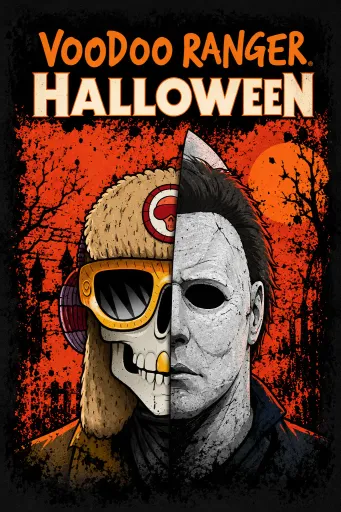

Описание продукта
О нас Halloween - The Game VooDoo Ranger Outfit and Sunglasses In-GameCosmetic DLC (Global) (PC) - Digital Key
Bring a distinctive Halloween look to your character with the Halloween: The Game VooDoo Ranger Outfit and Sunglasses In-Game Cosmetic Code. This digital code unlocks the VooDoo Outfit and VooDoo Glasses for Errc Dunn, giving you a themed cosmetic set to customize your in-game appearance.
Key Features
- VooDoo Outfit: Unlock the VooDoo Tint under Full Outfits for Errc Dunn.
- VooDoo Glasses: Add the matching VooDoo Glasses through the Eyewear customization menu.
- In-Game Cosmetics: Cosmetic content designed to customize your character's appearance.
- Digital Code: Receive a code that can be redeemed directly within HALLOWEEN: THE GAME.
- Character Specific: The VooDoo cosmetics are available for Errc Dunn under the Civilians character category.
Activation Guide
- Launch HALLOWEEN: THE GAME.
- From the Extras menu, select GRAVEYARD.
- Select REDEEM CODE in the middle of the screen.
- Enter the code provided with your purchase and confirm to redeem the content.
- To equip the VooDoo Outfit, go to Main Menu > Characters > Civilians > Errc Dunn.
- Select Edit Loadout > Full Outfits and choose Voodoo Tint.
- To equip the VooDoo Glasses, return to Edit Loadout and select Eyewear.
- Choose Voodoo Glasses to equip the cosmetic.
Customize Errc Dunn with the complete VooDoo-themed look and add the VooDoo Outfit and Glasses to your HALLOWEEN: THE GAME collection with this convenient digital cosmetic code.
Дополнительные сведения
- Дата выхода2026-09-07
- ИздателиIllFonic
- РазработчикиIllFonic
Выбор DriffleОписание продукта
О нас Halloween - The Game VooDoo Ranger Outfit and Sunglasses In-GameCosmetic DLC (Global) (PC) - Digital Key
Bring a distinctive Halloween look to your character with the Halloween: The Game VooDoo Ranger Outfit and Sunglasses In-Game Cosmetic Code. This digital code unlocks the VooDoo Outfit and VooDoo Glasses for Errc Dunn, giving you a themed cosmetic set to customize your in-game appearance.
Key Features
- VooDoo Outfit: Unlock the VooDoo Tint under Full Outfits for Errc Dunn.
- VooDoo Glasses: Add the matching VooDoo Glasses through the Eyewear customization menu.
- In-Game Cosmetics: Cosmetic content designed to customize your character's appearance.
- Digital Code: Receive a code that can be redeemed directly within HALLOWEEN: THE GAME.
- Character Specific: The VooDoo cosmetics are available for Errc Dunn under the Civilians character category.
Activation Guide
- Launch HALLOWEEN: THE GAME.
- From the Extras menu, select GRAVEYARD.
- Select REDEEM CODE in the middle of the screen.
- Enter the code provided with your purchase and confirm to redeem the content.
- To equip the VooDoo Outfit, go to Main Menu > Characters > Civilians > Errc Dunn.
- Select Edit Loadout > Full Outfits and choose Voodoo Tint.
- To equip the VooDoo Glasses, return to Edit Loadout and select Eyewear.
- Choose Voodoo Glasses to equip the cosmetic.
Customize Errc Dunn with the complete VooDoo-themed look and add the VooDoo Outfit and Glasses to your HALLOWEEN: THE GAME collection with this convenient digital cosmetic code.
Дополнительные сведения
- Дата выхода2026-09-07
- ИздателиIllFonic
- РазработчикиIllFonic
Регион