

- Pagrindinis
- Programinė įranga
- Nuance Dragon Professional 16 (Global) (PC...

Nuance Dragon Professional 16 (Global) (PC) 1 Device Lifetime - Digital Key
Regionas: Global

Platforma: Nuance
Veikia: Windows
Regionas
Platforma
Veikia
Global
Svarbus pranešimas:
This license is compatible with Windows only and supports the English version only.
 Driffle pasirinkimas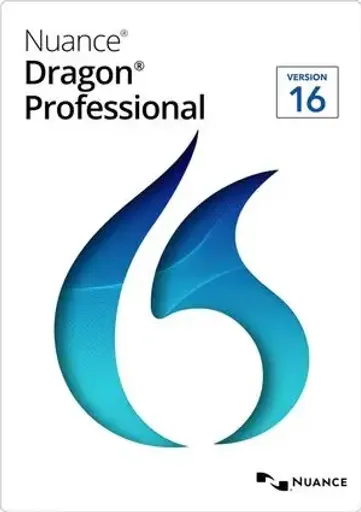
Produkto aprašymas
Apie Nuance Dragon Professional 16 (Global) (PC) 1 Device Lifetime - Digital Key
Nuance Dragon Professional 16 is a professional speech recognition and voice productivity solution designed to help users create documents, dictate text, control supported applications, and perform everyday computer tasks using their voice.
Dragon Professional 16 provides accurate speech-to-text recognition and allows users to dictate documents, emails, reports, notes, and other content while using voice commands to navigate and control supported Windows applications.
The software adapts to the user's voice and vocabulary over time, providing a personalized dictation experience and helping improve productivity.
KEY FEATURES:
- Advanced speech recognition and voice dictation
- Convert spoken words into text in real time
- Create and edit documents using voice commands
- Control supported Windows applications by voice
- Dictate emails, reports, notes, and documents
- Personalized voice recognition
- Support for custom vocabulary and specialized terminology
- Voice commands for repetitive tasks and workflows
- Designed for professional and business productivity
- Fast and accurate speech-to-text conversion
COMPATIBILITY:
- Operating System: Windows only
- Language: English version only
- Devices: 1 Device
- License Duration: Lifetime
DOWNLOAD & ACTIVATION INSTRUCTIONS:
- Visit the official Nuance Product Download Center: https://download.nuance.com/Nuance/downloadform.aspx?language=en-EN
- Complete the required information on the download page.
- Follow the instructions displayed by Nuance to download the Dragon Professional 16 installation files.
- Run the downloaded installer and follow the installation wizard.
- Accept the license agreement and enter the provided Dragon Professional 16 Serial Number when requested.
- Complete the installation and launch Dragon Professional 16.
- When the Activation window appears, select Activate Product and click Next.
- Confirm the Serial Number and continue with the online activation.
- Click Finish once the activation process has been completed.
An active internet connection is required for downloading and activating the product.
Kiti duomenys
- LeidėjaiNuance
- KūrėjaiNuance
Driffle pasirinkimasProdukto aprašymas
Apie Nuance Dragon Professional 16 (Global) (PC) 1 Device Lifetime - Digital Key
Nuance Dragon Professional 16 is a professional speech recognition and voice productivity solution designed to help users create documents, dictate text, control supported applications, and perform everyday computer tasks using their voice.
Dragon Professional 16 provides accurate speech-to-text recognition and allows users to dictate documents, emails, reports, notes, and other content while using voice commands to navigate and control supported Windows applications.
The software adapts to the user's voice and vocabulary over time, providing a personalized dictation experience and helping improve productivity.
KEY FEATURES:
- Advanced speech recognition and voice dictation
- Convert spoken words into text in real time
- Create and edit documents using voice commands
- Control supported Windows applications by voice
- Dictate emails, reports, notes, and documents
- Personalized voice recognition
- Support for custom vocabulary and specialized terminology
- Voice commands for repetitive tasks and workflows
- Designed for professional and business productivity
- Fast and accurate speech-to-text conversion
COMPATIBILITY:
- Operating System: Windows only
- Language: English version only
- Devices: 1 Device
- License Duration: Lifetime
DOWNLOAD & ACTIVATION INSTRUCTIONS:
- Visit the official Nuance Product Download Center: https://download.nuance.com/Nuance/downloadform.aspx?language=en-EN
- Complete the required information on the download page.
- Follow the instructions displayed by Nuance to download the Dragon Professional 16 installation files.
- Run the downloaded installer and follow the installation wizard.
- Accept the license agreement and enter the provided Dragon Professional 16 Serial Number when requested.
- Complete the installation and launch Dragon Professional 16.
- When the Activation window appears, select Activate Product and click Next.
- Confirm the Serial Number and continue with the online activation.
- Click Finish once the activation process has been completed.
An active internet connection is required for downloading and activating the product.
Kiti duomenys
- LeidėjaiNuance
- KūrėjaiNuance
Regionas