

The gaming industry is growing bigger and bigger each year. With the best AAA or indie titles coming our way, there’s no chance one can resist them. And to buy these hottest titles, one needs a secure and trustworthy platform, and that’s where Steam comes into the picture. Steam is the most trusted platform for buying and playing games all around the world. And while using it, one always comes up with a question: How to use Steam keys? Let’s find the answer below.
What is Steam?
Steam is a massive game distribution platform created by Valve, where people can buy, download, and play computer games. Launched in 2003, it lets users connect with friends, chat, join game communities, and get automatic updates or news for their games. Steam works on Windows, Mac, and Linux, and it offers the largest collection of PC games in the world, making it a popular place for gamers to find and enjoy games. It offers games in a variety of genres, including action, adventure, RPG, sci-fi, horror, shooter, multiplayer, racing, simulation, sports, and more. Steam is free to use and includes features like game sales, social networking, and cloud storage for saved games.

Key Facts About Steam As Of 2025
- More than 135 million people use Steam every month.
- Over 70 million people log in to Steam every day.
- Over 15000+ games were added to Steam in 2024 alone.
- The battle royale game PUBG: Battlegrounds holds the record for the most concurrent Steam players, with a peak of 3.26 million players.
- Every year, there’s an average of 9-10% growth in Steam’s peak concurrent user count.
- The Steam catalog features over 100,000 games.
- The Steam catalog includes over 63,000 indie games, more than any other genre.
- The action and adventure genres each include over 50,000 titles on Steam.
- Almost 97% of Steam users access the platform on Windows.

How to Use Steam Keys?
Using Steam keys is very easy. All one has to do is purchase the key, redeem it on the Steam platform, and then the game or content is added to the Steam library, ready to download and play. The process is straightforward and user-friendly, making it accessible even for beginners. Read on below to know how to buy and redeem Steam keys.
How to Buy Steam Keys In 2025?
There are two different ways to buy Steam keys: directly from Steam and from trusted third-party platforms like Driffle. Knowing how to use Steam keys starts with purchasing them safely and properly.
The following are the steps to buy Steam Keys directly from Steam:
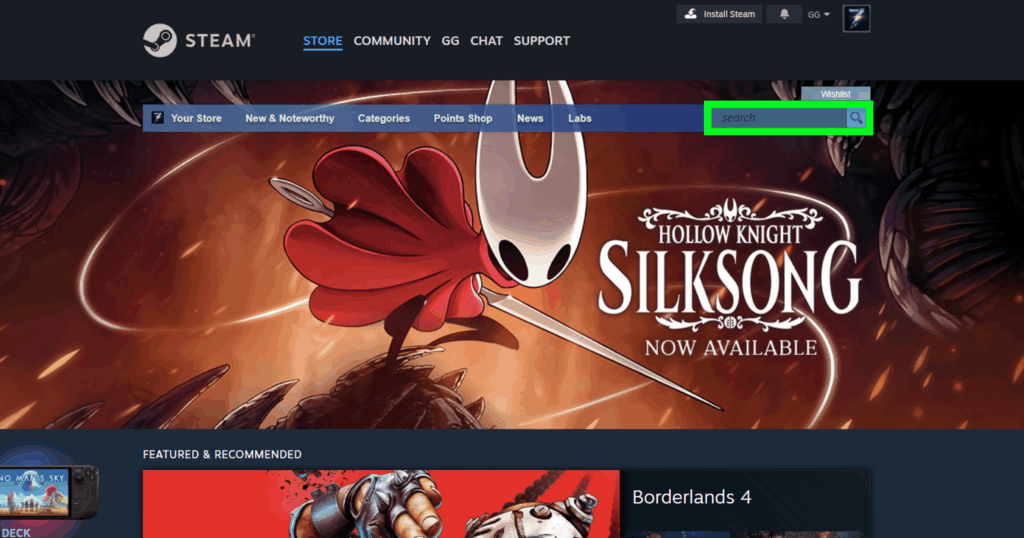
- Go to the Steam Store website or open the Steam client, and sign in to your Steam account.

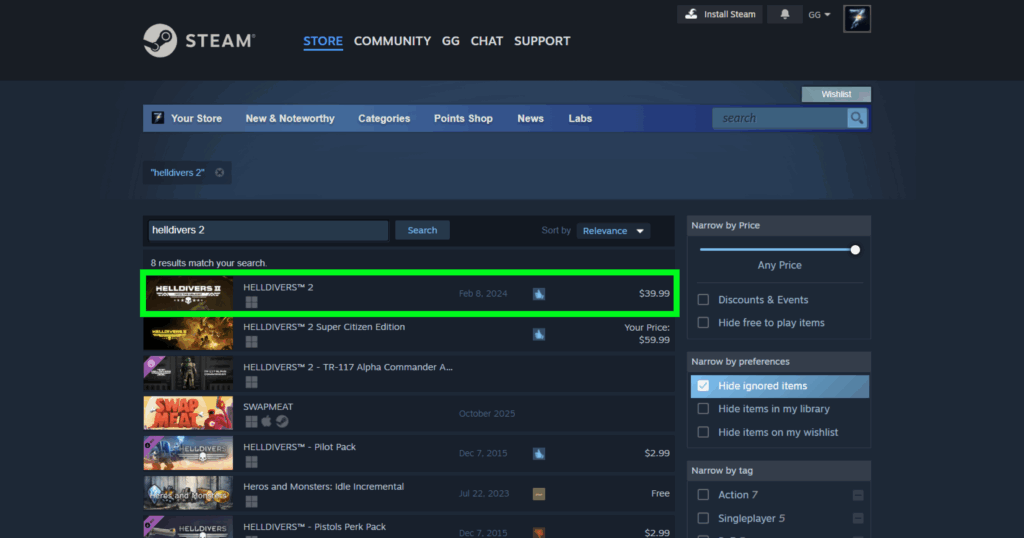
2. Search for the game you want to buy. Let’s take ‘Helldivers 2’ as an example here.
3. Click on the game from the shown results.
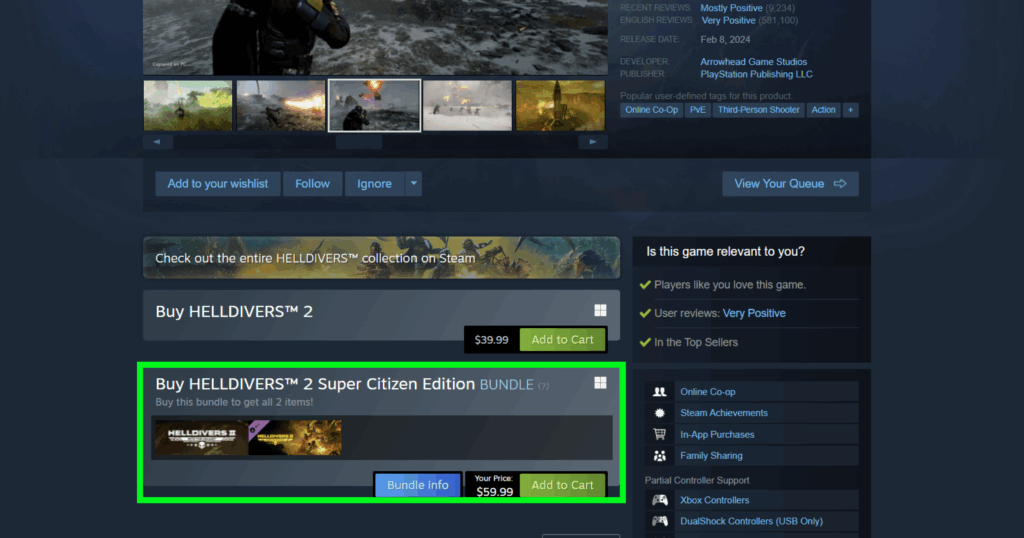
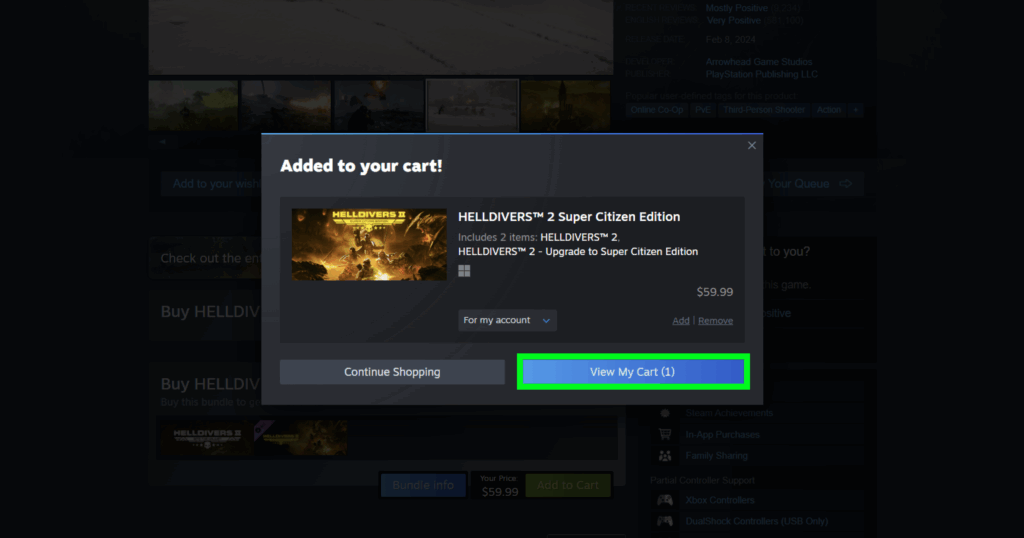
4. Select the edition you want to purchase.
5. Then click on ‘View My Cart‘.
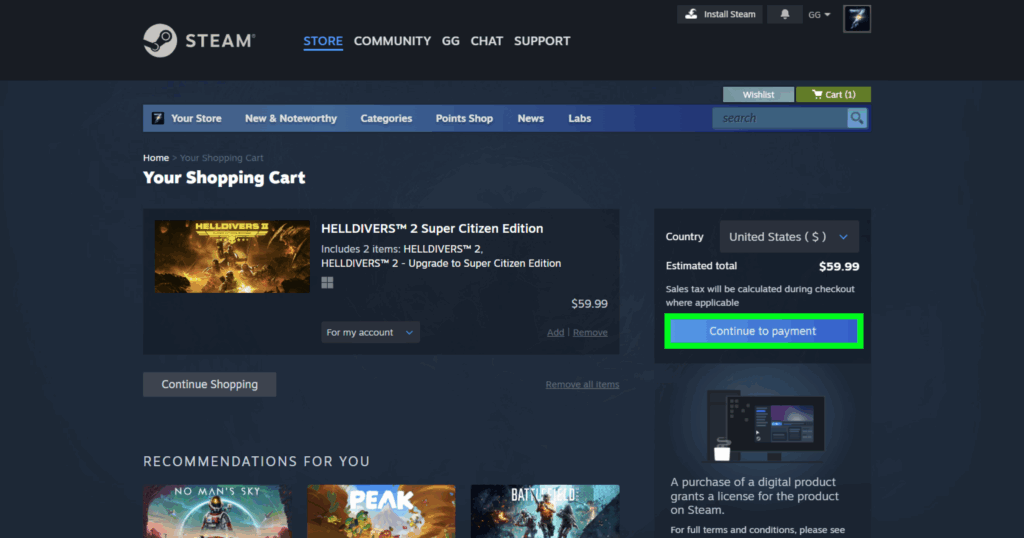
6. Then click on ‘Continue to Payment’.
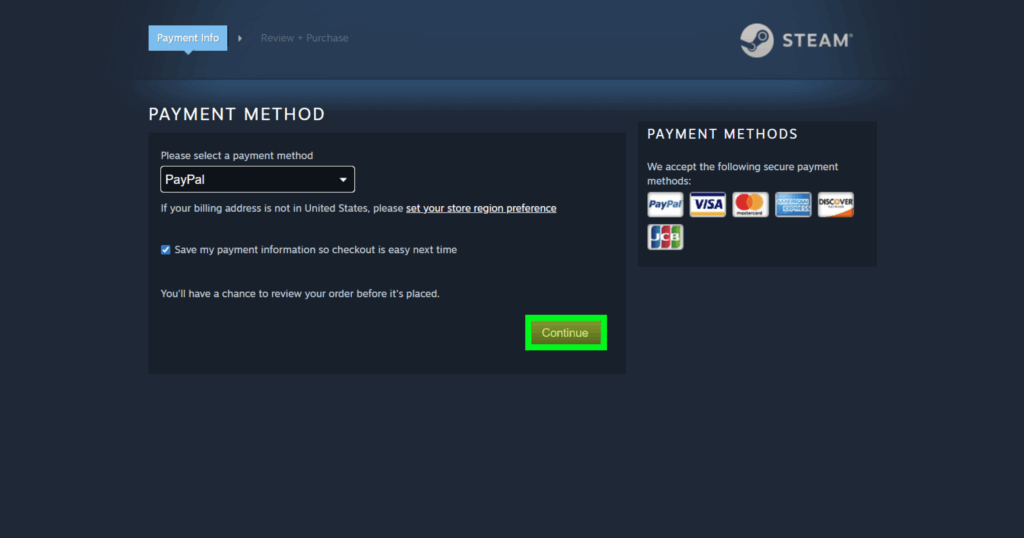
7. Complete the payment from your desired payment method and click on ‘Continue’.
8. In the next window, agree to the Steam Subscriber Agreement and click on ‘Purchase’ to finalize the transaction.
After the completion of the process, the game will automatically be added to your Steam library; no separate key is needed. These steps enable you to purchase and own the game directly on your Steam account with ease, making it simple to understand how to use Steam keys.
The following are the steps to buy Steam Keys at a cheaper price from Driffle:
- First, you need to visit Driffle’s website.
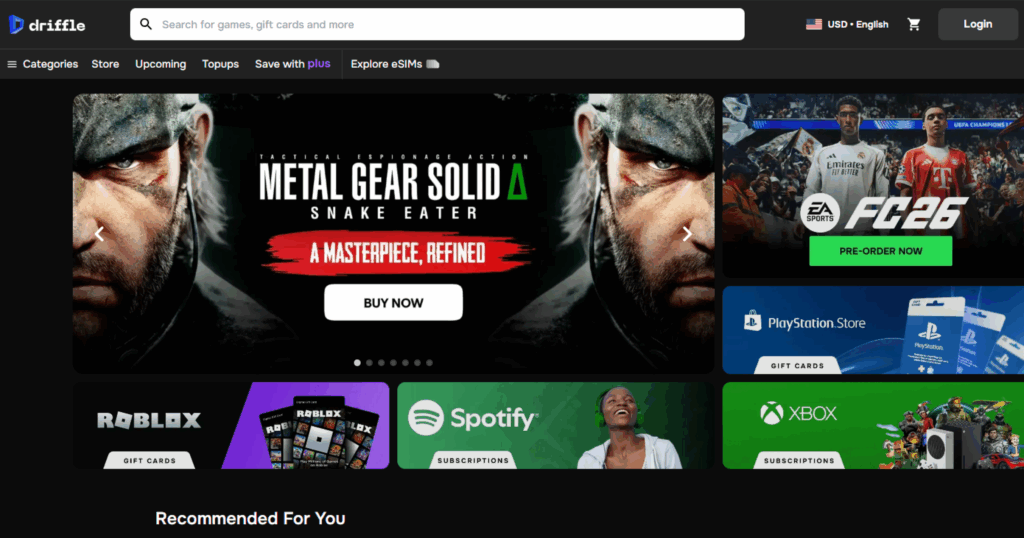
2. Click on the categories menu from the top left corner.
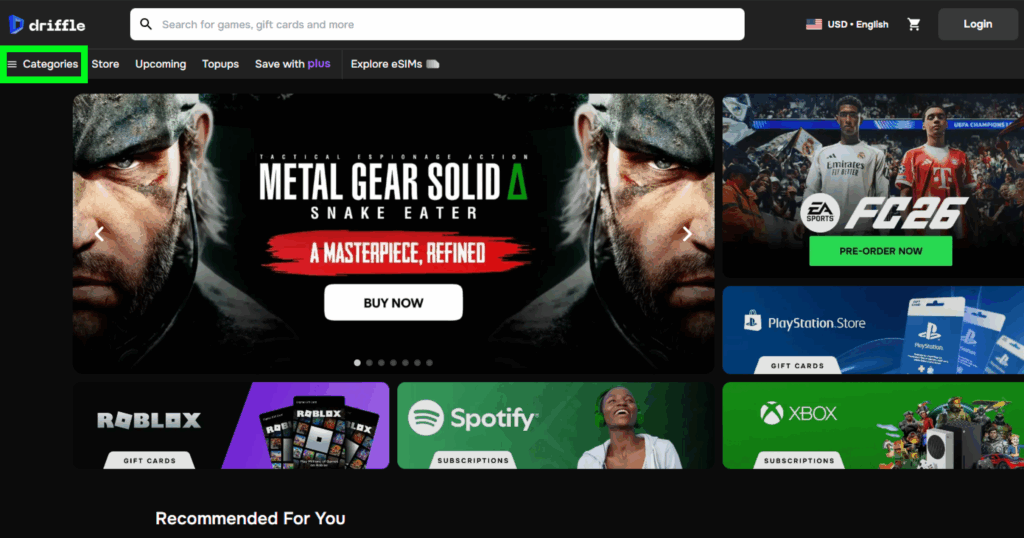
3. Click on Games> Gaming Platforms> Steam. Or search for a game from the search bar at the top. As: (name of the game) Steam.

4. Select your desired game(s), their edition or DLC(s) with respect to your region, and add them to your cart, or click ‘Buy Now’.
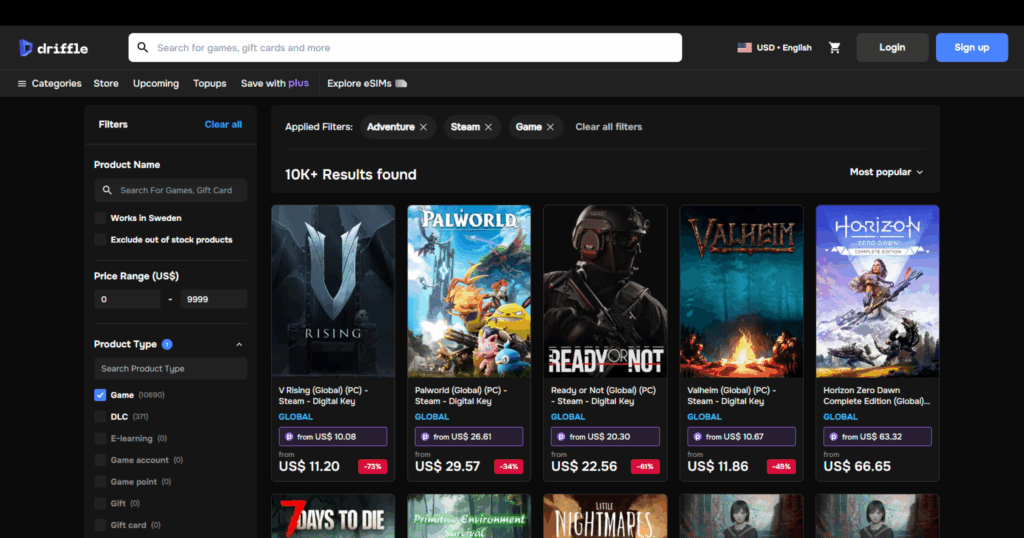
5. After selecting your game, click ‘Buy Now’. (From the results, we took ‘Mafia: The Old Country’ as an example here).

6. Go through the product(s) and the total, then click on ‘Proceed to checkout’.

7. Log in or sign in if required, then click continue to payment.

8. Complete the payment from your desired payment method.

9. Once done, your order will be delivered to the given email address instantly.
Understanding these simple steps makes how to use Steam keys even more efficient when purchasing from third parties.
How to Redeem Steam Keys in 2025?
Redeeming Steam keys is a very easy process. Just follow these simple steps:
- Open Steam, and sign in or log in to your Steam account.
2. At the home screen, click on the Games menu at the top left corner.

3. A drop-down menu will appear, then click on ‘Activate a Product on Steam…’.

4. A pop-up window will appear asking you to enter your product code.

5. After writing the code for your Steam game, click on ‘Confirm’.
After doing so, you can find your purchased item in your Steam Library, ready to download and play. This straightforward approach lets you quickly add purchased games to your Steam account and start playing without hassle.
Important Things to Keep in Mind While Using Steam Keys
- Steam keys are unique and can only be redeemed once on a single Steam account.
- Once redeemed, the key cannot be used again on another account.
- Trying to redeem a key for a game you already own will usually fail (unless it’s DLC).
- Always buy keys from trusted, official, or reputable sellers.
- Avoid suspiciously cheap keys; they may be revoked or invalid.
- Unsafe keys may lead to account issues or revoked licenses.
- Steam keys are non-refundable.
- Keys should not be resold or shared as they represent a digital license.
- Steam keys are often region-locked; they must match your account’s region to redeem.
- Some keys may be restricted by country or publisher agreements.

Being aware of these points is an important part of how to use Steam keys responsibly. And to find out whether or not Steam keys have an expiration date, read on below.
Best Selling Games on Steam in 2025
- Helldivers 2
- Borderlands 4
- Baldur’s Gate 3
- NBA 2K 26
- Red Dead Redemption 2
- Battlefield 6
- Metal Gear Solid Delta: Snake Eater
- Ready or Not
- Clair Obscur: Expedition 33
- Black Myth: Wukong
- EA Sports FC 26
- F1 25
- Cyberpunk 2077: Ultimate Edition
- Elden Ring
- Elden Ring Nightreign
- Dying Light: The Beast
- EA Sports Madden NFL 26
- Super Robot Wars Y
- Persona 5 Royal
- Silent Hill f
- Stellar Blade
- Call of Duty: Black Ops 7
- Forza Horizon 5
- Marvel’s Spider-Man 2
- Mafia: The Old Country

Grab the keys to your favourite Steam games at the cheapest price, here. And enjoy mastering how to use Steam keys with your newly purchased games.
Best Free-to-Play Games on Steam in 2025
- Counter Strike 2
- Dota 2
- The First Descendant
- Once Human
- PUBG: Battlegrounds
- Apex Legends
- Marvel Rivals
- Tom Clancy’s Rainbow Six Siege X
- Delta Force
- Overwatch 2
- The Sims 4
- Destiny 2
- eFootball
- Blood Strike
- Stumble Guys
- FragPunk
- Asphalt Legends
- The Finals
- Marvel Snap
- Warframe: Islewaever

Do Steam Keys Expire?
The answer to this question is simply No! Steam keys don’t expire, as they don’t have an expiry date. This allows you to redeem your Steam keys anytime you want, even if it’s years after buying. But there’s one thing that one should keep in mind – some promo keys or beta access keys may only work until a certain date, as they might have a set deadline. Additionally, if you buy a key from a third-party platform, it might also expire at some point in the future, so be sure to check. Once you redeem a key, the game is yours to keep forever. But if you don’t redeem it and it was part of a limited-time offer, the key could stop working after the offer ends. Knowing this is another essential aspect of how to use Steam keys effectively.

Summary
So this was all about how to use Steam keys. As a trusted platform globally, Steam allows you to buy, download, and play thousands of games easily. You can purchase Steam keys directly from Steam or from trusted third-party sites like Driffle for cheaper prices. The buying and redeeming process is so smooth and user-friendly that it makes it very easy for anyone to understand how to use Steam keys within minutes. Just remember, always buy keys from reliable sources, and that keys are unique, non-refundable, and usually region-locked.

Do you use Steam? If yes, then how do you like it? Let us know in the comments below. And for more gaming news, guides, tips, and more, check out Driffle Blog.


