

Xbox is one of the most popular gaming platforms today, with over 500 million active users. Since its launch in 2001, Xbox has offered huge titles to the gaming community, like Halo, Gears of War, Forza Horizon, Fable, and Sea of Thieves. Its popularity has grown over the years as Xbox has kept dropping iconic exclusives, smoother online services, and constant gaming innovations. Plus, with Xbox Gift Cards, it has made buying games, add-ons, and subscriptions easier and more flexible for players. Let’s learn what box gift cards are and how to redeem Xbox gift cards.
About Xbox Gift Cards
Xbox Gift Cards are prepaid digital or physical cards that add funds to your Microsoft account. They were launched in 2013, replacing the old Microsoft Points system for digital purchases. You can use the balance to buy Xbox games, downloadable content (DLC), in-game currency, subscriptions like Xbox Game Pass, movies, and even apps. They’re available in different denominations, don’t require a credit card, and make it easy to shop securely on Xbox consoles, the Microsoft Store, or Windows PCs. Gamers have been taking advantage of Xbox Gift Cards to easily buy games, add-ons, and subscriptions.
Uses of Xbox Gift Cards
Xbox Gift Cards offer various uses. You can buy Xbox games, in-game items, movies, and more.
- Xbox Games: You can buy exciting games for Xbox Series X|S, Xbox One, and older titles with an Xbox Gift Card.
- Downloadable Content (DLC): You can claim expansions, new levels, characters, upgrades, and other extra features with Xbox gift cards.
- In-Game Items: In-game items and currencies like Fortnite V-Bucks, COD Points (Call of Duty), FIFA Points, and other purchasable.
- Xbox Game Pass: You can also grab Xbox subscriptions like Game Pass Ultimate, Xbox Game Pass for Console, or PC Game Pass with Xbox Gift Cards.
- Xbox Live Gold: These gift cards let you subscribe to online multiplayer, free monthly games, and discounts with Xbox Live Gold.
- Movies & TV Shows: You can also redeem Xbox codes to rent or buy movies and series from the Microsoft Store.
- Apps: You can download paid apps and tools that are available on Xbox and Windows.

Benefits
Xbox Gift Cards are easy to use and offer tons of benefits.
- Easy to Use: Xbox gift cards are super easy to use. Just redeem the code and start shopping.
- No Credit Card Needed: You can spend without linking bank details.
- Works on Most Things: You can use Xbox gift cards to redeem games, DLC, virtual currency, movies, and applications.
- Excellent as a Gift: Xbox cards are a great gift for those who love gaming.
- Never Expire: Xbox gift cards are good forever, so you can use them whenever you want.
- Instant Delivery: Your Xbox gift card code will be delivered to you instantly via email.
- Budget-Friendly: Xbox gift cards are affordable and come in many denominations to fit your budget.
- Access to Deals: You can use your gift card balance during Xbox deals for maximum value.
How to Redeem Xbox Gift Cards Online?
This is how to redeem Xbox Gift Cards on Xbox and PC. Make sure you have a stable internet connection when you are trying to redeem your gift card.
On the Xbox Console
- Turn on your Xbox and sign in to your account.
- Press the Xbox button on your controller to open the guide.
- Go to Store and click on Redeem.
- Enter the 25-character code from your gift card.
- Confirm to add the funds or subscription to your account.
On the Microsoft Store Website
1. Visit the Microsoft website.

2. Sign in to your Microsoft account.

3. Click your profile icon and select Redeem Code.

4. Enter your gift card code and click Next.

How To Check Xbox Gift Card Balance
You can check your Xbox gift card balance easily through the official Microsoft Website or the Xbox app.
On the Microsoft Website
- Go to Microsoft’s website.
- Sign in with your Xbox account.
- Open Payment & Billing in your account settings.
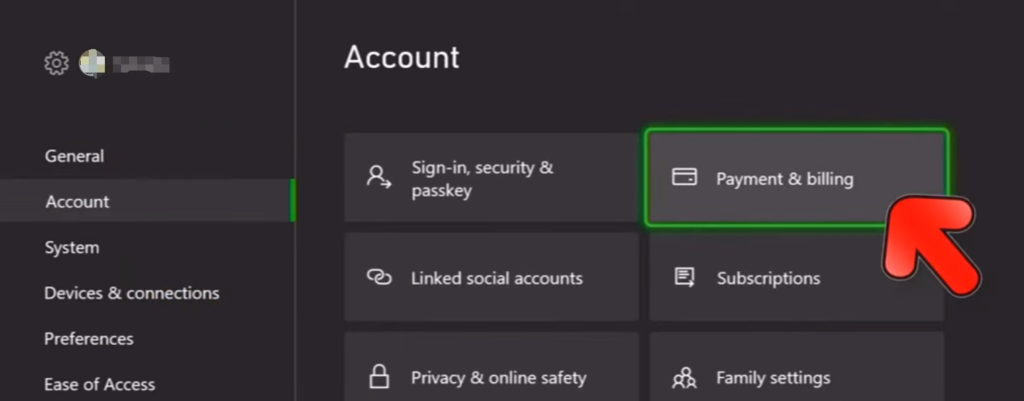
4. Select Gift Card Balance to see how much money you have.
On the Xbox App
- Download and open the Xbox app (Android/iOS).
- Sign in with your Microsoft account.
- Go to Settings
- Click on Account or Billing to view your balance.
Troubleshooting Common Redemption Issues
Try out these measures if your Xbox Gift Card is not working.
- Double-check the code: Make sure you entered the gift card code correctly.
- Check your account region: Gift cards should be compatible with your Microsoft or Xbox account region.
- Check if the card is not used: You can redeem Xbox gift cards only if they are not already used.
- Check internet connection: You need a stable internet connection to redeem Xbox codes.
- Update your Xbox or Microsoft app: Apps that are outdated may cause errors so update your platform.
- Contact support if necessary: As a last resort, contact Xbox/Microsoft support for assistance.
Gifting Xbox Gift Cards to Friends and Family
Xbox Gift Card will make a great gift option if your friends or family members love gaming. You just have to grab a gift card for the specific amount you want, they will receive the code via email, you can put in a personal message, and you’re done! Just make sure the recipient’s Xbox or Microsoft account matches the card’s region. After this, guide them on how to redeem Xbox gift cards if they need any help. They can then redeem the Xbox codes instantly for games, in-game items, subscriptions, or more. It’s gonna make a great gift on occasions like birthdays, anniversaries, or other special times.

Where to get Xbox Gift Cards
You can buy digital Xbox Gift Cards on Driffle, a digital marketplace, and a popular choice for gamers for Gaming Gift Cards. Just search for ‘Xbox Gift Cards,’ select a value, and proceed to checkout. You will always find the lowest prices and will get your codes delivered instantly, so you can quickly redeem them. You can also grab a gift card as a gift for a friend and get the code delivered to them. Driffle makes it easy to buy games, in-game content, software, hardware, and more with gift cards. The payments are safe and secure, so you can pursue the transactions without any hassles.

So, get your Xbox gift cards and continue your gaming spree without a doubt!


