

If you have played games like Mario and Pokemon on Nintendo, you surely know that feeling is unmatched. Gamers love Nintendo Switch and Nintendo Switch 2 as they provide players with access to multiple games which they can download and play from the Nintendo eShop. Nintendo also offers gift cards which allow users to buy games and other items by loading money onto their accounts without needing a bank card. These gift cards are easy to use, great for gifting, and help players enjoy games in a convenient way. Let’s learn how to redeem Nintendo gift card.
What is a Nintendo Gift Card?
A Nintendo Gift Card is a prepaid card which lets users purchase games and other digital content through Nintendo’s online store known as the Nintendo eShop. It comes loaded with a particular amount which can be spent on Nintendo’s platform. Users need to redeem their gift card code to their account which allows them to purchase games, add-ons and subscriptions for their Nintendo Switch device. People really love it as a present as it is easy to use and can be redeemed for a lot of exciting content.

Why do you need a Nintendo Gift Card?
- Easy game purchases: The Nintendo Gift Card lets you make game purchases at the Nintendo eShop without needing credit or debit card payment methods.
- Safe and secure: It is safe to use the Nintendo Gift Card as you don’t need any bank info or sensitive details to use it.
- Quick code use: You need to use a unique code to redeem your gift card. The process is very quick and smooth.
- Perfect gift choice: The gift is suitable for friends and family who enjoy playing games on Nintendo devices.
- Extra game content: The Nintendo gift card might also unlock extra game content for you, like game items, add-ons and expansion packs.
- Works on switch: The gift card enables users to access its features through Nintendo Switch devices.
- Spending control: The gift card allows you to define a spending limit which helps you control your expenses.
- Use anytime: The Nintendo gift card allows you to make purchases at any time because it has no expiration date.
- Flexible pricing: The Nintendo gift card is available in different denominations and you can select what suits your budget.
How to Redeem Nintendo Gift Card?
1. Open eShop: Go to the Nintendo eShop on your Nintendo Switch. It is the orange shopping bag icon.
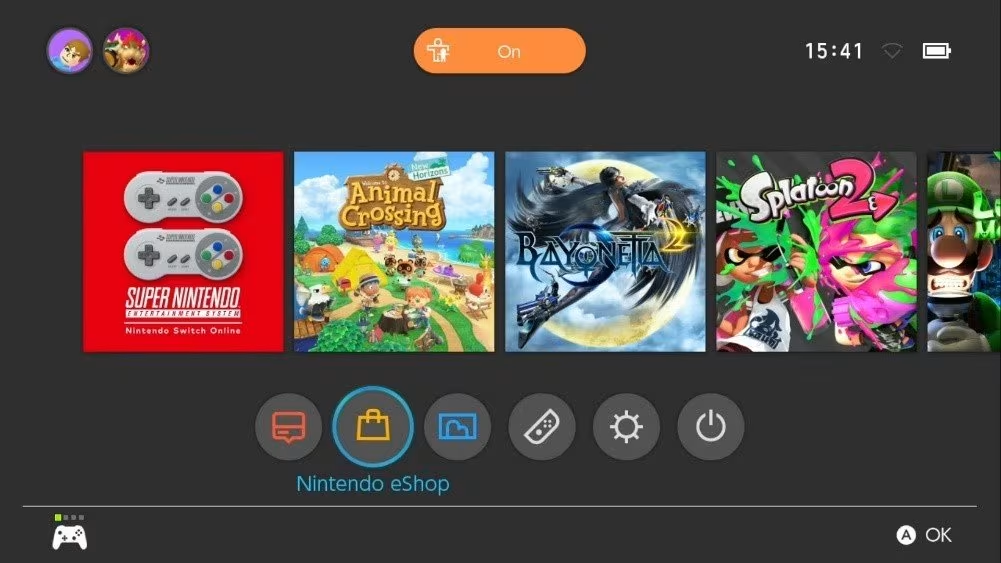
2. Choose Your Account: After that, select your user profile where you want to add the money.
3. Find Redeem Option: On the left side menu, you will see ‘Enter Code’ or ‘Redeem Code.’
4. Enter the Code: Type the 16-character code from your gift card carefully.

5. Check the Code: Make sure the code is typed correctly before you move to the next step.
6. Confirm: Press ‘OK’ or ‘Confirm’ to continue.
7. Money Added: The amount from the gift card will be added to your account balance.
8. Start Using: Now you can use the money to buy games or other content.
Where to Buy Nintendo Gift Cards
Driffle is the best spot for purchasing Nintendo Gift Cards because they provide authentic codes from certified sellers. Your code will be delivered to you instantly and give you immediate access to Nintendo eShop where you can select any games you wish to play. Driffle provides users with simple navigation features while offering access to multiple gaming gift cards like Xbox, PlayStation and Steam. It also provides secure payment options so your transactions will stay safe. You can grab Nintendo gift cards for yourself or gift them to friends and family.
For more gaming news, guides, tips, codes, and more, check out Driffle Blog.


