Roblox offers an endless number of games to offer. And thus, the exclusive content they bring with it, such as in-game items, skins, cosmetics, memberships, and more. Being played by players globally, many buy Roblox gift cards to get Robux and buy these exclusive items. Therefore, many ask where and how to buy and redeem Roblox gift cards and Robux safely. So, let’s get to know more about how to redeem your Roblox gift card and start exploring everything Roblox has to offer!

What is a Roblox Gift Card?
A Roblox Gift Card is a prepaid card that you can buy online from trusted sellers like Driffle. When you redeem it on the Roblox website, it gives you credit that you can use to buy Robux or a Roblox Premium Membership. After redeeming the code, you can spend the credit to get Robux or membership benefits. They are a simple way to pay for fun stuff inside Roblox without using regular money directly.
What can I buy with a Roblox Gift Card?
You can use a Roblox gift card to buy Robux, which is the virtual currency on Roblox. With Robux, you can purchase a variety of virtual items and benefits, including avatar accessories, emotes, game passes in different games, and even a Roblox Premium subscription. To learn more about Robux and what you can buy with them, keep on reading below.
What are Robux?
Robux is the special money used inside Roblox. You can buy Robux with real money and then use them to get things in the game like clothes, hats, and special powers for your game character. Some games on Roblox also let you pay with Robux to enter or unlock fun features. It’s like virtual money only for Roblox that helps you enjoy the game more by buying virtual items or game passes.

What can I buy with Robux?
You can use Robux to purchase a wide variety of virtual items on Roblox. These include:
Avatar items in Roblox
- Clothing: Buy shirts, pants, and other clothing items for your Avatar.
- Accessories: Purchase accessories like hats, glasses, and masks, including limited edition items.
- Animations: Get different animation packs for your avatar.
- Avatar Bundles: Purchase complete avatar outfits at once.

In-game purchases
- Game Passes: These are permanent perks or access to special features within a specific game, priced by the developer.
- Developer Products: These are consumable items or boosts that can be purchased within a game, like temporary advantages or in-game currency.
Others
- Private Servers: Create your own private server for a game.
- Uploading content: Use Robux to upload video thumbnails to enhance the game experience.
- Advertising: Spend Robux to advertise your own game.
How to Buy a Roblox Gift Card?
Follow these simple steps to buy a Roblox gift card at the cheapest price from Driffle:
- Go to the website: Visit the Driffle website.
- Search: Search for Roblox Gift Card in the search bar at the top.
- Select: Choose your preferred denomination and region. Driffle offers Roblox Gift Cards in various denominations (currency and regions).
- Add to cart: Add the selected gift card to your cart and proceed to checkout.
- Sign in/ up: Create or log in to your Driffle account.
- Payment: Complete the payment using your preferred payment method.
- Instant Delivery: After purchase, you’ll receive a digital code (activation key) instantly via email.
How to Redeem a Roblox Gift Card?
Follow these simple steps to redeem your Roblox gift card:
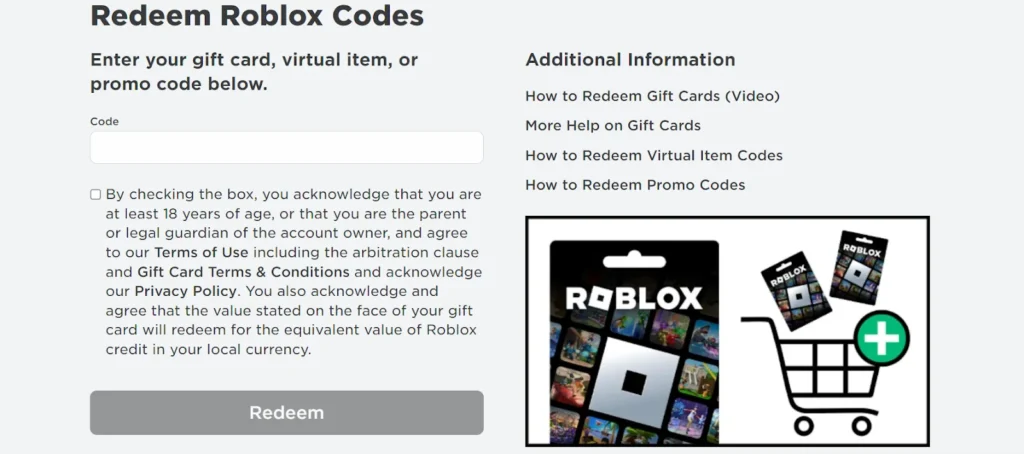
- Navigate to the redemption page: Open a web browser and go to roblox.com/redeem. (A Roblox gift card can only be redeemed in a browser.)
- Log in: Sign in to your Roblox account. If you don’t have one, create one first.
- Enter the code: Enter the PIN/ code and enter it into the Code box on the website. Pay close attention to the letters and numbers, as some can look similar (like “0” and “O”).
- Complete the redemption: Click the “Redeem” button.
- Confirm: A success message will appear once the credit is successfully added to your account.
Things to keep in mind while buying a Roblox Gift Card
- Types of Cards: Roblox Gift Cards come in two types: Credit, real money value for buying Robux, or Roblox Premium Memberships. And Robux, the virtual currency added to the account balance.
- Trusted Seller: Always purchase from trusted major sellers like Driffle to avoid scams or invalid codes.
- Non-refundable/ reloadable: Roblox gift cards are not refundable or reloadable.
- Roblox gift cards cannot be resold.
- Redemption: Cards must be redeemed online through a web browser at roblox.com/redeem. You cannot redeem them in the Roblox mobile app or on a video game console.
- Currency: If you redeem a gift card in a different currency than your account, the value will be converted to your account’s local currency.
- Expiration: Roblox gift card codes do not expire and can be redeemed anytime.
- Region: Some cards are region-specific, so be sure to buy cards for your region.
Summary
So now you know how to redeem a Roblox gift card. Just with these simple steps, you’ll be able to credit your account with Robux and spend them on your favourite items instantly. Also, don’t forget that these cards are non-refundable and non-reloadable. However, they also don’t have an expiration date, so you can redeem them anytime you want at your convenience.
Buy the cheapest Roblox Gift Card from Driffle. And for more gaming news, guides, tips, tricks, and more, check out Driffle Blog.